
Justin Guitar Lessons & Songs
MusopiaEducation
4.53.04K Reviews
- Version
- 3.26.0
- Installs
- 1.00M
- Age Rating
- Teen
Screenshots


Our Review of Justin Guitar Lessons & Songs
 Analysis by Appyee
When a guitar ends up in the living room, learning to play can become a shared household project: one person follows a lesson, another asks what that chord is called, and someone else picks up the instrument later to try it. I like Justin Guitar Lessons & Songs for that kind of casual, beginner-friendly use because its lessons give practice some direction without making a new player feel they need to know music theory first. It is an education app from Musopia, and its focus is practical guitar learning rather than a general collection of music tutorials.
One guitar, different practice turns
A realistic way to use it is to leave the guitar ready in a shared room and take short turns: one learner works through a lesson, while another revisits a chord or tries a song section. That can make it easier to fit practice around dinner, homework, or a busy evening than arranging a formal lesson at a fixed time. The app’s guided format gives each person a clear starting point, though progress still depends on picking up the guitar and repeating the movements away from the screen.
Shared use works best when learners treat the app as a guide, not as a record of everyone’s progress. If two people use the same device, agree whose lesson you are following before starting and avoid assuming that one person’s place or pace will suit the other. A complete beginner may need to spend time on basic chord changes, while someone who already plays may want to move past introductory material. Keeping separate practice notes—such as a paper list of the chords that felt awkward—can help household members avoid losing track without relying on any special family feature.
Setting expectations before practice
It is free to download, but in-app purchases range from $2.49 to $249.99 per item, so I would check the purchase details in the app before treating every part of the experience as included. That matters especially on a shared device: make sure the person starting a purchase understands what it costs and whether it is something the household actually wants. The free entry point makes it easier to try the teaching approach first, rather than paying upfront just to find out whether the lesson style suits you.
For a household, another useful boundary is deciding what “practice” means. A short session focused on one chord transition is often more productive than browsing songs for half an hour and never playing them. I would set a small aim before opening the app—tune the guitar, review one technique, then repeat a change slowly—so the phone supports the playing instead of becoming the main activity. This also helps if one person is waiting to use the instrument next.
Choosing a learner and a learning pace
The app is rated Teen, which is worth keeping in mind when a younger learner shares a device with an adult. That rating is useful context, but it does not replace a parent or guardian’s judgment about the child, the device, or any purchases. The app’s beginner orientation can be reassuring for a first-time player, yet learners should still be comfortable following on-screen instruction and practicing independently for stretches.
Justin Guitar has a 4.4 average from around 24,000 ratings and more than a million installs. Those figures suggest that many people have tried it, but they cannot tell you whether its pace, song choices, or teaching style will click for your household. I would use the first sessions as a fit test: can the learner understand the explanation, hold the guitar comfortably, and stay interested long enough to repeat a task? If not, a slower in-person demonstration or a teacher who can watch hand position may be a better next step.
Discovering the Magic of Guitar
When I first stumbled upon Justin Guitar Lessons & Songs, I was skeptical. I mean, can an app really teach you to play guitar? Spoiler alert: it can, and it does it pretty darn well. The app is designed by Justin Sandercoe, a renowned guitar teacher, who’s been helping folks strum their way to success for years. And let me tell you, his teaching style is as chill as it gets.
Getting Started with Ease
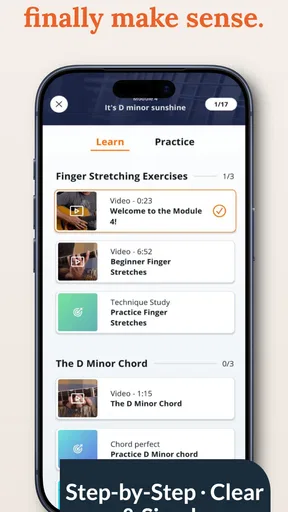
As soon as you open the app, you're greeted with a friendly, user-friendly interface. Seriously, it’s like the app is saying, "Hey, don’t worry, we got this!" The lessons are organized neatly, making it super easy to jump in no matter your skill level. From absolute beginners to those who can already play a few tunes, there’s something for everyone.
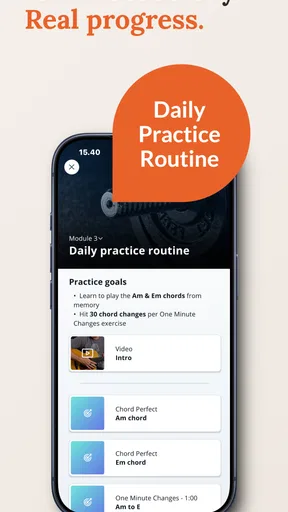
The app starts you off with the basics: how to hold the guitar, basic chords, and even a bit of music theory. And here’s where it gets interesting – it doesn’t feel like a lecture. Justin’s laid-back teaching style makes learning feel like you’re just jamming with a friend, which is exactly what I needed to stay motivated.
A Playlist for All Tastes
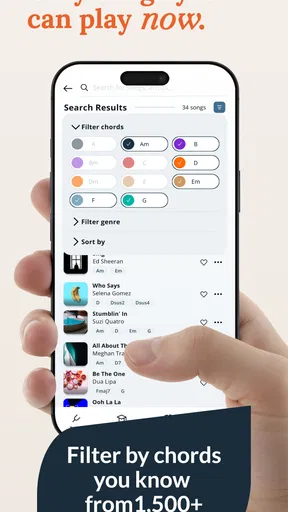
Now, we all know practice can sometimes feel like a chore. But what if you could practice by playing your favorite songs? Yep, this app has a killer song library. From classic rock to pop hits, there’s a variety of jams to choose from. So, whether you’re into The Beatles or Ed Sheeran, you’ll find something that tickles your fancy.
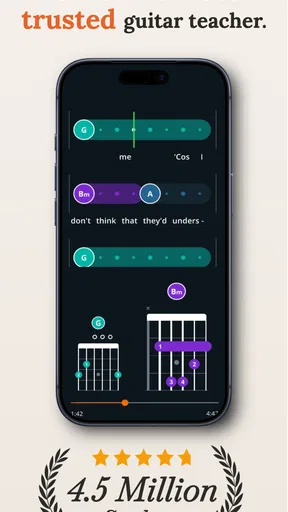
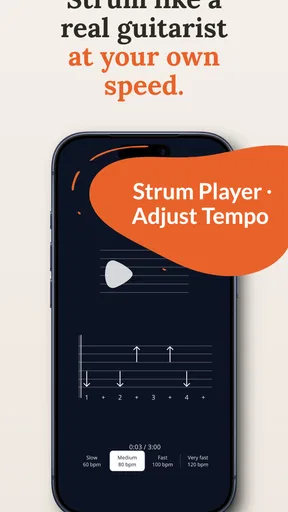
Each song comes with step-by-step guidance, ensuring you’re strumming the right chords at the right time. It’s like having a personal tutor, but one that lets you learn at your own pace. You can even slow down the songs if you’re struggling to keep up, which I found super helpful during my learning sessions.
Interactive Tools to Keep You in Tune
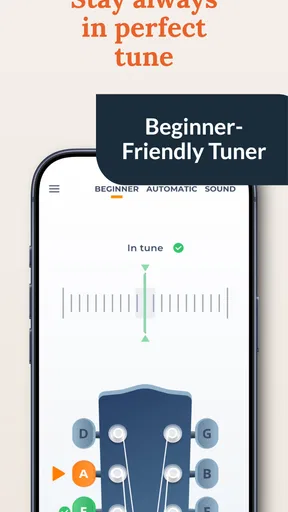
One of the coolest features, in my opinion, is the interactive tools. The app includes a tuner, metronome, and even a chord library. Trust me, these tools are lifesavers. I mean, who wants to sound like a cat in distress because their guitar is out of tune, right?
- Tuner: Keeps your guitar in perfect pitch, ensuring your practice sounds as good as possible.
- Metronome: Helps you keep time, which is essential if you want to play with others.
- Chord Library: Gives you quick access to all the chords you’ll need, complete with finger positioning.
Community and Support
Another thing I love about this app is the sense of community. There’s a forum where you can connect with other learners, share your progress, and even ask for advice. It’s like a virtual jam session where everyone’s cheering you on. Plus, if you ever get stuck, there’s a helpful support team ready to assist.
Where it fits among guitar-learning options
Compared with searching for individual guitar videos, a structured lesson path can save time: you spend less of a session deciding what to watch and more of it practicing a particular skill. That structure is especially helpful when you are new enough that you cannot yet tell whether a tutorial is skipping an important step. The trade-off is that a fixed lesson sequence may not match every learner’s goals. Someone focused on a specific playing style or advanced technique may prefer a specialist course or direct feedback from a teacher.
Compared with private lessons, the app is easier to fit around an unpredictable schedule and gives you room to replay explanations at your own pace. But a screen cannot notice that your wrist is tense, your fingertips are muting a neighboring string, or your posture is making a movement harder than it needs to be. I would use the app to build a routine and learn foundations, then seek a person’s feedback if a physical technique keeps feeling uncomfortable or progress stalls despite careful practice.
A more useful way to practice songs
The song guidance is most valuable when you resist the urge to play at full speed immediately. I would first identify the chord changes, then practice moving between the two that cause the most hesitation. Once that movement feels less clumsy, bring in the song and use its slower playback to work on timing. This turns a favorite track into a focused exercise rather than a test of whether you can already keep up.
There is also a small but important trade-off in learning through familiar songs: recognition can make a piece feel easier than it is. Knowing the melody does not mean your chord changes or rhythm are ready. If a song sounds messy, step back to the relevant chord shapes or use the metronome to establish a steady pulse before trying again. That kind of deliberate repetition may feel less exciting, but it is often what makes the next attempt sound more like music.
Making the tools work for you
The tuner, metronome, and chord library cover several common reasons a beginner stops mid-session to search elsewhere. I would tune before each practice rather than assuming the guitar stayed in tune, especially if it has been moved around a shared room. When a chord is unfamiliar, use the library to check the fingering, then look away from the screen and form it on the neck. The goal is to build recall, not to keep consulting a diagram every time.
The metronome is useful even when you are practicing alone, but starting slowly is more revealing than setting a fast tempo to feel ambitious. If you lose the beat while changing chords, reduce the task: strum once per beat, or pause between changes until your fingers land cleanly. The app can supply a reference, but it cannot decide whether your hand is relaxed or whether a tempo is sensible for your current skill. Listening closely is still part of the work.
Who should choose another route
This is a strong fit for a beginner who wants a guided starting point, likes learning through songs, and can practice without someone correcting every movement. It can also suit a returning player who wants a low-pressure way to refresh chords and timing. I would be less likely to recommend it as the only resource for someone preparing for a performance on a deadline, pursuing a narrow technical goal, or needing feedback tailored to a physical limitation. In those situations, lessons with a human teacher can address details an app cannot see.
It may also disappoint a learner who expects the app to create consistency for them. A neatly arranged lesson does not make practice automatic, and having a large set of songs to choose from can become a distraction if you keep hopping between them. Pick one lesson or one song goal for a session and finish that small piece of work before browsing further. That simple boundary makes the app more useful without requiring a long practice block.
Version, compatibility, and the decision to try it
The current version is 3.23.3, and the listed minimum operating-system requirement is version 7.0. It is a free app with optional in-app purchases, so I would begin by exploring the available learning path and checking purchase prompts carefully rather than assuming every lesson or resource is included at no cost. That distinction is particularly helpful when a parent is setting up the app for a younger player or when several people share one device.
Released on December 8, 2016, Justin Guitar has had time to become a familiar option in mobile guitar learning, but the decision still comes down to the person holding the instrument. For a household, I would recommend trying it with one learner first, agreeing on short practice turns, and keeping a simple note of what each person wants to work on next. If the lessons make it easier to pick up the guitar again tomorrow, that is a more meaningful sign of fit than choosing the most impressive-looking song on day one.
Final Thoughts
So, is Justin Guitar Lessons & Songs worth downloading? Absolutely. It’s a comprehensive, engaging, and fun way to learn guitar, whether you’re just starting or looking to brush up on your skills. With its wide range of songs, easy-to-follow lessons, and handy tools, it’s like having a guitar teacher in your pocket. So go ahead, give it a try, and get ready to strum your heart out!
Download it today from the app store and start your musical journey. Who knows, you might just become the next guitar hero in your circle!
Verdict
Strengths of Justin Guitar Lessons & Songs
- Comprehensive lesson library for all levels.
- User-friendly interface with clear navigation.
- High-quality video tutorials with close-ups.
- Regular updates with new songs and lessons.
- Includes practice tools like metronome and tuner.
Limitations of Justin Guitar Lessons & Songs
- Requires internet connection for videos.
- Some advanced lessons behind a paywall.
- Limited genre diversity in song choices.
- No offline mode for lesson access.
- Occasional app crashes reported by users.
Other Releases by Musopia
View All
Kala: Learn Ukulele & Tuner
Music & Audio4.6
Similar Picks in This Category
View All
Duolingo: Language Lessons
Duolingo4.7

Google Classroom
Google LLC2.8

Unacademy: Learn & Crack Exams
Unacademy3.2

Bible App for Kids
Life.Church4.4

Cake - Learn English & Korean
Cake Corp.4.7

Brainly: AI Homework Helper
Brainly4.5
Frequently Asked Questions
What features does Justin Guitar Lessons & Songs offer?
Justin Guitar Lessons & Songs provides a comprehensive learning experience with video tutorials, interactive exercises, and a vast library of songs. It caters to beginners and advanced players alike, offering step-by-step lessons, chord charts, and practice routines. The app also includes a community feature where users can interact and share progress.
Is Justin Guitar Lessons & Songs suitable for beginners?
Yes, the app is specifically designed to accommodate beginners with its structured learning path and easy-to-follow video lessons. It starts with the basics, such as chord introductions and strumming patterns, gradually advancing to more complex techniques, making it ideal for users with no prior guitar experience.
How much does the app cost and are there in-app purchases?
Justin Guitar Lessons & Songs is free to download, but it offers in-app purchases for premium content. While the free version provides access to basic lessons and a selection of songs, subscribing to premium unlocks additional lessons, exclusive songs, and advanced features. Pricing details can be found within the app.
Can I use the app offline?
While some features of Justin Guitar Lessons & Songs require an internet connection, such as streaming video lessons, the app allows users to download content for offline use. This is particularly useful for practicing on the go without worrying about connectivity issues. Check the app settings for download options.
Is there a community or support feature within the app?
Yes, Justin Guitar Lessons & Songs includes a community feature where users can connect, ask questions, and share their progress. The app also provides customer support for technical issues and lesson-related inquiries. Users can access forums and reach out directly through the app for assistance.
